Key Functionality#
import xarray as xr
import sdf_xarray as sdfxr
import matplotlib.pyplot as plt
%matplotlib inline
Loading SDF files#
There are several ways to load SDF files:
To load a single file, use
xarray.open_dataset,sdf_xarray.open_datatreeorxarray.open_datatreeTo load multiple files, use
sdf_xarray.open_mfdataset,xarray.open_mfdatasetorsdf_xarray.open_mfdatatree.To access the raw contents of a single SDF file, use
sdf_xarray.sdf_interface.SDFFile.
Note
When loading SDF files, variables related to boundaries, cpu and output file are excluded as they are problematic. If you wish to load these in please use the
Loading raw files approach.
Tip
All code examples throughout this documentation are visualised using Jupyter notebooks
so that you can interactively explore xarray.Dataset objects. To do this on your machine
make sure that you have the necessary dependencies installed:
pip install "sdf-xarray[jupyter]"
Loading single files#
xr.open_dataset("tutorial_dataset_1d/0010.sdf")
<xarray.Dataset> Size: 341kB
Dimensions:                                       (X_Grid_mid: 200,
                                                   Px_px_py_Electron: 200,
                                                   Py_px_py_Electron: 200,
                                                   X_Grid: 201,
                                                   Px_px_py_Electron_mid: 199,
                                                   Py_px_py_Electron_mid: 199)
Coordinates:
  * X_Grid_mid                                    (X_Grid_mid) float64 2kB -4...
  * Px_px_py_Electron                             (Px_px_py_Electron) float64 2kB ...
  * Py_px_py_Electron                             (Py_px_py_Electron) float64 2kB ...
  * X_Grid                                        (X_Grid) float64 2kB -5e-06...
  * Px_px_py_Electron_mid                         (Px_px_py_Electron_mid) float64 2kB ...
  * Py_px_py_Electron_mid                         (Py_px_py_Electron_mid) float64 2kB ...
Data variables: (12/15)
    Wall_time                                     float64 8B ...
    Electric_Field_Ex                             (X_Grid_mid) float64 2kB ...
    Electric_Field_Ey                             (X_Grid_mid) float64 2kB ...
    Magnetic_Field_Bz                             (X_Grid_mid) float64 2kB ...
    Total_Particle_Energy_Electron                float64 8B ...
    Total_Particle_Energy_Ion                     float64 8B ...
    ...                                            ...
    Derived_Number_Density_Ion                    (X_Grid_mid) float64 2kB ...
    Derived_Temperature_Electron                  (X_Grid_mid) float64 2kB ...
    Derived_Temperature_Ion                       (X_Grid_mid) float64 2kB ...
    dist_fn_px_py_Electron                        (Px_px_py_Electron, Py_px_py_Electron) float64 320kB ...
    Absorption_Total_Laser_Energy_Injected        float64 8B ...
    Absorption_Fraction_of_Laser_Energy_Absorbed  float64 8B ...
Attributes: (12/21)
    filename:         tutorial_dataset_1d/0010.sdf
    file_version:     1
    file_revision:    4
    code_name:        Epoch1d
    step:             188
    time:             5.016803991780179e-14
    ...               ...
    compile_machine:  uoy24x520
    compile_flags:    unknown
    defines:          50364612
    compile_date:     Wed May 14 13:13:41 2025
    run_date:         Wed Nov 12 12:44:42 2025
io_date: Wed Nov 12 12:44:42 2025Alternatively, you can load the data in as a xarray.DataTree, which organises the data
hierarchically into groups (for example grouping related quantities such as the individual
components of the electric and magnetic fields) while keeping each item as a xarray.Dataset.
sdfxr.open_datatree("tutorial_dataset_1d/0010.sdf")
<xarray.DataTree>
Group: /
│   Dimensions:                              ()
│   Data variables:
│       Wall-time                            float64 8B ...
│       Total_Particle_Energy_in_Simulation  float64 8B ...
│       Total_Field_Energy_in_Simulation     float64 8B ...
│   Attributes: (12/21)
│       filename:         tutorial_dataset_1d/0010.sdf
│       file_version:     1
│       file_revision:    4
│       code_name:        Epoch1d
│       step:             188
│       time:             5.016803991780179e-14
│       ...               ...
│       compile_machine:  uoy24x520
│       compile_flags:    unknown
│       defines:          50364612
│       compile_date:     Wed May 14 13:13:41 2025
│       run_date:         Wed Nov 12 12:44:42 2025
│       io_date:          Wed Nov 12 12:44:42 2025
├── Group: /Electric_Field
│       Dimensions:     (X_Grid_mid: 200)
│       Coordinates:
│         * X_Grid_mid  (X_Grid_mid) float64 2kB -4.95e-06 -4.85e-06 ... 1.495e-05
│       Data variables:
│           Ex          (X_Grid_mid) float64 2kB ...
│           Ey          (X_Grid_mid) float64 2kB ...
├── Group: /Magnetic_Field
│       Dimensions:     (X_Grid_mid: 200)
│       Coordinates:
│         * X_Grid_mid  (X_Grid_mid) float64 2kB -4.95e-06 -4.85e-06 ... 1.495e-05
│       Data variables:
│           Bz          (X_Grid_mid) float64 2kB ...
├── Group: /Total_Particle_Energy
│       Dimensions:   ()
│       Data variables:
│           Electron  float64 8B ...
│           Ion       float64 8B ...
├── Group: /Absorption
│       Dimensions:                            ()
│       Data variables:
│           Total_Laser_Energy_Injected        float64 8B ...
│           Fraction_of_Laser_Energy_Absorbed  float64 8B ...
├── Group: /Derived
│   ├── Group: /Derived/Number_Density
│   │       Dimensions:     (X_Grid_mid: 200)
│   │       Coordinates:
│   │         * X_Grid_mid  (X_Grid_mid) float64 2kB -4.95e-06 -4.85e-06 ... 1.495e-05
│   │       Data variables:
│   │           Electron    (X_Grid_mid) float64 2kB ...
│   │           Ion         (X_Grid_mid) float64 2kB ...
│   └── Group: /Derived/Temperature
│           Dimensions:     (X_Grid_mid: 200)
│           Coordinates:
│             * X_Grid_mid  (X_Grid_mid) float64 2kB -4.95e-06 -4.85e-06 ... 1.495e-05
│           Data variables:
│               Electron    (X_Grid_mid) float64 2kB ...
│               Ion         (X_Grid_mid) float64 2kB ...
└── Group: /dist_fn
    └── Group: /dist_fn/px_py
            Dimensions:            (Px_px_py_Electron: 200, Py_px_py_Electron: 200)
            Coordinates:
              * Px_px_py_Electron  (Px_px_py_Electron) float64 2kB -1.492e-21 ... 1.492e-21
              * Py_px_py_Electron  (Py_px_py_Electron) float64 2kB -1.492e-21 ... 1.492e-21
            Data variables:
Electron (Px_px_py_Electron, Py_px_py_Electron) float64 320kB ...Loading raw files#
If you wish to load data directly from the SDF.C library and ignore
the xarray interface layer.
raw_ds = sdfxr.SDFFile("tutorial_dataset_1d/0010.sdf")
raw_ds.variables.keys()
dict_keys(['Wall-time', 'Electric Field/Ex', 'Electric Field/Ey', 'Magnetic Field/Bz', 'Total Particle Energy/Electron', 'Total Particle Energy/Ion', 'Total Particle Energy in Simulation', 'Total Field Energy in Simulation', 'Derived/Number_Density/Electron', 'Derived/Number_Density/Ion', 'Derived/Temperature/Electron', 'Derived/Temperature/Ion', 'dist_fn/px_py/Electron', 'Electron_Probe/Px', 'Electron_Probe/Py', 'Electron_Probe/Pz', 'Electron_Probe/weight', 'Absorption/Total Laser Energy Injected', 'Absorption/Fraction of Laser Energy Absorbed', 'CPUs/Original rank', 'CPUs/Current rank'])
Loading multiple files#
Multiple files can be loaded using one of two methods. The first of which
is by using the sdf_xarray.open_mfdataset.
Tip
If your simulation includes multiple output blocks that specify different variables
for output at various time steps, variables not present at a specific step will default
to a nan value. To clean your dataset by removing these nan values we suggest using the
xarray.DataArray.dropna function or Loading sparse data.
sdfxr.open_mfdataset("tutorial_dataset_1d/*.sdf")
<xarray.Dataset> Size: 14MB
Dimensions:                                       (time: 41, X_Grid_mid: 200,
                                                   Px_px_py_Electron: 200,
                                                   Py_px_py_Electron: 200,
                                                   X_Grid: 201,
                                                   Px_px_py_Electron_mid: 199,
                                                   Py_px_py_Electron_mid: 199)
Coordinates:
  * time                                          (time) float64 328B 1.334e-...
  * X_Grid_mid                                    (X_Grid_mid) float64 2kB -4...
  * Px_px_py_Electron                             (Px_px_py_Electron) float64 2kB ...
  * Py_px_py_Electron                             (Py_px_py_Electron) float64 2kB ...
  * X_Grid                                        (X_Grid) float64 2kB -5e-06...
  * Px_px_py_Electron_mid                         (Px_px_py_Electron_mid) float64 2kB ...
  * Py_px_py_Electron_mid                         (Py_px_py_Electron_mid) float64 2kB ...
Data variables: (12/15)
    Wall_time                                     (time) float64 328B 0.00419...
    Electric_Field_Ex                             (time, X_Grid_mid) float64 66kB dask.array<chunksize=(1, 200), meta=np.ndarray>
    Electric_Field_Ey                             (time, X_Grid_mid) float64 66kB dask.array<chunksize=(1, 200), meta=np.ndarray>
    Magnetic_Field_Bz                             (time, X_Grid_mid) float64 66kB dask.array<chunksize=(1, 200), meta=np.ndarray>
    Total_Particle_Energy_Electron                (time) float64 328B 3.639e+...
    Total_Particle_Energy_Ion                     (time) float64 328B 3.57e+0...
    ...                                            ...
    Derived_Number_Density_Ion                    (time, X_Grid_mid) float64 66kB dask.array<chunksize=(1, 200), meta=np.ndarray>
    Derived_Temperature_Electron                  (time, X_Grid_mid) float64 66kB dask.array<chunksize=(1, 200), meta=np.ndarray>
    Derived_Temperature_Ion                       (time, X_Grid_mid) float64 66kB dask.array<chunksize=(1, 200), meta=np.ndarray>
    dist_fn_px_py_Electron                        (time, Px_px_py_Electron, Py_px_py_Electron) float64 13MB dask.array<chunksize=(1, 200, 200), meta=np.ndarray>
    Absorption_Total_Laser_Energy_Injected        (time) float64 328B 1.416e+...
    Absorption_Fraction_of_Laser_Energy_Absorbed  (time) float64 328B 0.0 ......
Attributes: (12/21)
    filename:         /home/docs/checkouts/readthedocs.org/user_builds/sdf-xa...
    file_version:     1
    file_revision:    4
    code_name:        Epoch1d
    step:             0
    time:             1.3342563807926084e-16
    ...               ...
    compile_machine:  uoy24x520
    compile_flags:    unknown
    defines:          50364612
    compile_date:     Wed May 14 13:13:41 2025
    run_date:         Wed Nov 12 12:44:42 2025
io_date: Wed Nov 12 12:44:42 2025Alternatively, you can load the data in as a xarray.DataTree, which organises the data
hierarchically into groups (for example grouping related quantities such as the individual
components of the electric and magnetic fields) while keeping each item as a xarray.Dataset.
sdfxr.open_mfdatatree("tutorial_dataset_1d/*.sdf")
<xarray.DataTree>
Group: /
│   Dimensions:                              (time: 41)
│   Coordinates:
│     * time                                 (time) float64 328B 1.334e-16 ... 2....
│   Data variables:
│       Wall-time                            (time) float64 328B 0.004197 ... 1.028
│       Total_Particle_Energy_in_Simulation  (time) float64 328B 7.209e+06 ... 1....
│       Total_Field_Energy_in_Simulation     (time) float64 328B 0.0 ... 1.25e+09
│   Attributes: (12/21)
│       filename:         /home/docs/checkouts/readthedocs.org/user_builds/sdf-xa...
│       file_version:     1
│       file_revision:    4
│       code_name:        Epoch1d
│       step:             0
│       time:             1.3342563807926084e-16
│       ...               ...
│       compile_machine:  uoy24x520
│       compile_flags:    unknown
│       defines:          50364612
│       compile_date:     Wed May 14 13:13:41 2025
│       run_date:         Wed Nov 12 12:44:42 2025
│       io_date:          Wed Nov 12 12:44:42 2025
├── Group: /Electric_Field
│       Dimensions:     (time: 41, X_Grid_mid: 200)
│       Coordinates:
│         * X_Grid_mid  (X_Grid_mid) float64 2kB -4.95e-06 -4.85e-06 ... 1.495e-05
│       Data variables:
│           Ex          (time, X_Grid_mid) float64 66kB dask.array<chunksize=(1, 200), meta=np.ndarray>
│           Ey          (time, X_Grid_mid) float64 66kB dask.array<chunksize=(1, 200), meta=np.ndarray>
├── Group: /Magnetic_Field
│       Dimensions:     (time: 41, X_Grid_mid: 200)
│       Coordinates:
│         * X_Grid_mid  (X_Grid_mid) float64 2kB -4.95e-06 -4.85e-06 ... 1.495e-05
│       Data variables:
│           Bz          (time, X_Grid_mid) float64 66kB dask.array<chunksize=(1, 200), meta=np.ndarray>
├── Group: /Total_Particle_Energy
│       Dimensions:   (time: 41)
│       Data variables:
│           Electron  (time) float64 328B 3.639e+06 3.601e+06 ... 1.083e+10 1.07e+10
│           Ion       (time) float64 328B 3.57e+06 3.57e+06 ... 1.301e+09 1.313e+09
├── Group: /Absorption
│       Dimensions:                            (time: 41)
│       Data variables:
│           Total_Laser_Energy_Injected        (time) float64 328B 1.416e+06 ... 1.70...
│           Fraction_of_Laser_Energy_Absorbed  (time) float64 328B 0.0 0.9661 ... 0.5871
├── Group: /Derived
│   ├── Group: /Derived/Number_Density
│   │       Dimensions:     (time: 41, X_Grid_mid: 200)
│   │       Coordinates:
│   │         * X_Grid_mid  (X_Grid_mid) float64 2kB -4.95e-06 -4.85e-06 ... 1.495e-05
│   │       Data variables:
│   │           Electron    (time, X_Grid_mid) float64 66kB dask.array<chunksize=(1, 200), meta=np.ndarray>
│   │           Ion         (time, X_Grid_mid) float64 66kB dask.array<chunksize=(1, 200), meta=np.ndarray>
│   └── Group: /Derived/Temperature
│           Dimensions:     (time: 41, X_Grid_mid: 200)
│           Coordinates:
│             * X_Grid_mid  (X_Grid_mid) float64 2kB -4.95e-06 -4.85e-06 ... 1.495e-05
│           Data variables:
│               Electron    (time, X_Grid_mid) float64 66kB dask.array<chunksize=(1, 200), meta=np.ndarray>
│               Ion         (time, X_Grid_mid) float64 66kB dask.array<chunksize=(1, 200), meta=np.ndarray>
└── Group: /dist_fn
    └── Group: /dist_fn/px_py
            Dimensions:            (time: 41, Px_px_py_Electron: 200, Py_px_py_Electron: 200)
            Coordinates:
              * Px_px_py_Electron  (Px_px_py_Electron) float64 2kB -1.492e-21 ... 1.492e-21
              * Py_px_py_Electron  (Py_px_py_Electron) float64 2kB -1.492e-21 ... 1.492e-21
            Data variables:
Electron (time, Px_px_py_Electron, Py_px_py_Electron) float64 13MB dask.array<chunksize=(1, 200, 200), meta=np.ndarray>Alternatively files can be loaded using xarray.open_mfdataset however when loading in
all the files we have do some processing of the data so that we can correctly align it along
the time dimension; This is done via the preprocess parameter utilising the
sdf_xarray.SDFPreprocess function.
xr.open_mfdataset(
   "tutorial_dataset_1d/*.sdf",
   join="outer",
   compat="no_conflicts",
   preprocess=sdfxr.SDFPreprocess()
)
<xarray.Dataset> Size: 14MB
Dimensions:                                       (time: 41, X_Grid_mid: 200,
                                                   Px_px_py_Electron: 200,
                                                   Py_px_py_Electron: 200,
                                                   X_Grid: 201,
                                                   Px_px_py_Electron_mid: 199,
                                                   Py_px_py_Electron_mid: 199)
Coordinates:
  * time                                          (time) float64 328B 1.334e-...
  * X_Grid_mid                                    (X_Grid_mid) float64 2kB -4...
  * Px_px_py_Electron                             (Px_px_py_Electron) float64 2kB ...
  * Py_px_py_Electron                             (Py_px_py_Electron) float64 2kB ...
  * X_Grid                                        (X_Grid) float64 2kB -5e-06...
  * Px_px_py_Electron_mid                         (Px_px_py_Electron_mid) float64 2kB ...
  * Py_px_py_Electron_mid                         (Py_px_py_Electron_mid) float64 2kB ...
Data variables: (12/15)
    Wall_time                                     (time) float64 328B 0.00419...
    Electric_Field_Ex                             (time, X_Grid_mid) float64 66kB dask.array<chunksize=(1, 200), meta=np.ndarray>
    Electric_Field_Ey                             (time, X_Grid_mid) float64 66kB dask.array<chunksize=(1, 200), meta=np.ndarray>
    Magnetic_Field_Bz                             (time, X_Grid_mid) float64 66kB dask.array<chunksize=(1, 200), meta=np.ndarray>
    Total_Particle_Energy_Electron                (time) float64 328B 3.639e+...
    Total_Particle_Energy_Ion                     (time) float64 328B 3.57e+0...
    ...                                            ...
    Derived_Number_Density_Ion                    (time, X_Grid_mid) float64 66kB dask.array<chunksize=(1, 200), meta=np.ndarray>
    Derived_Temperature_Electron                  (time, X_Grid_mid) float64 66kB dask.array<chunksize=(1, 200), meta=np.ndarray>
    Derived_Temperature_Ion                       (time, X_Grid_mid) float64 66kB dask.array<chunksize=(1, 200), meta=np.ndarray>
    dist_fn_px_py_Electron                        (time, Px_px_py_Electron, Py_px_py_Electron) float64 13MB dask.array<chunksize=(1, 200, 200), meta=np.ndarray>
    Absorption_Total_Laser_Energy_Injected        (time) float64 328B 1.416e+...
    Absorption_Fraction_of_Laser_Energy_Absorbed  (time) float64 328B 0.0 ......
Attributes: (12/21)
    filename:         /home/docs/checkouts/readthedocs.org/user_builds/sdf-xa...
    file_version:     1
    file_revision:    4
    code_name:        Epoch1d
    step:             0
    time:             1.3342563807926084e-16
    ...               ...
    compile_machine:  uoy24x520
    compile_flags:    unknown
    defines:          50364612
    compile_date:     Wed May 14 13:13:41 2025
    run_date:         Wed Nov 12 12:44:42 2025
io_date: Wed Nov 12 12:44:42 2025Loading sparse data#
When dealing with sparse data (where different variables are saved at different,
non-overlapping time steps) you can optimize memory usage by loading the data with
sdf_xarray.open_mfdataset using the parameter separate_times=True. This
approach creates a distinct time dimension for each output block, avoiding the
need for a single, large time dimension that would be filled with nan values. This
significantly reduces memory consumption, though it requires more deliberate handling
if you need to compare variables that exist on these different time coordinates.
sdfxr.open_mfdataset("tutorial_dataset_1d/*.sdf", separate_times=True)
<xarray.Dataset> Size: 14MB
Dimensions:                                       (time0: 41, X_Grid_mid: 200,
                                                   Px_px_py_Electron: 200,
                                                   Py_px_py_Electron: 200,
                                                   X_Grid: 201,
                                                   Px_px_py_Electron_mid: 199,
                                                   Py_px_py_Electron_mid: 199)
Coordinates:
  * time0                                         (time0) float64 328B 1.334e...
  * X_Grid_mid                                    (X_Grid_mid) float64 2kB -4...
  * Px_px_py_Electron                             (Px_px_py_Electron) float64 2kB ...
  * Py_px_py_Electron                             (Py_px_py_Electron) float64 2kB ...
  * X_Grid                                        (X_Grid) float64 2kB -5e-06...
  * Px_px_py_Electron_mid                         (Px_px_py_Electron_mid) float64 2kB ...
  * Py_px_py_Electron_mid                         (Py_px_py_Electron_mid) float64 2kB ...
Data variables: (12/15)
    Wall_time                                     (time0) float64 328B 0.0041...
    Electric_Field_Ex                             (time0, X_Grid_mid) float64 66kB dask.array<chunksize=(1, 200), meta=np.ndarray>
    Electric_Field_Ey                             (time0, X_Grid_mid) float64 66kB dask.array<chunksize=(1, 200), meta=np.ndarray>
    Magnetic_Field_Bz                             (time0, X_Grid_mid) float64 66kB dask.array<chunksize=(1, 200), meta=np.ndarray>
    Total_Particle_Energy_Electron                (time0) float64 328B 3.639e...
    Total_Particle_Energy_Ion                     (time0) float64 328B 3.57e+...
    ...                                            ...
    Derived_Number_Density_Ion                    (time0, X_Grid_mid) float64 66kB dask.array<chunksize=(1, 200), meta=np.ndarray>
    Derived_Temperature_Electron                  (time0, X_Grid_mid) float64 66kB dask.array<chunksize=(1, 200), meta=np.ndarray>
    Derived_Temperature_Ion                       (time0, X_Grid_mid) float64 66kB dask.array<chunksize=(1, 200), meta=np.ndarray>
    dist_fn_px_py_Electron                        (time0, Px_px_py_Electron, Py_px_py_Electron) float64 13MB dask.array<chunksize=(1, 200, 200), meta=np.ndarray>
    Absorption_Total_Laser_Energy_Injected        (time0) float64 328B 1.416e...
    Absorption_Fraction_of_Laser_Energy_Absorbed  (time0) float64 328B 0.0 .....
Attributes: (12/17)
    file_version:     1
    file_revision:    4
    code_name:        Epoch1d
    jobid1:           1762951482
    jobid2:           578
    code_io_version:  1
    ...               ...
    sha1sum:          2c0760ecfd5dc22b4f708889f1b166f8d7daa1d8eeb9d7f2b663fa0...
    compile_machine:  uoy24x520
    compile_flags:    unknown
    defines:          50364612
    compile_date:     Wed May 14 13:13:41 2025
run_date: Wed Nov 12 12:44:42 2025Loading particle data#
Warning
It is not recommended to use xarray.open_mfdataset or
sdf_xarray.open_mfdataset to load particle data from multiple
SDF outputs. The number of particles often varies between outputs,
which can lead to inconsistent array shapes that these functions
cannot handle. Instead, consider loading each file individually and
then concatenating them manually.
Note
When loading multiple probes from a single SDF file, you must use the
probe_names parameter to assign a unique name to each. For example,
use probe_names=["Front_Electron_Probe", "Back_Electron_Probe"].
Failing to do so will result in dimension name conflicts.
By default, particle data isn’t kept as it takes up a lot of space.
Pass keep_particles=True as a keyword argument to
xarray.open_dataset (for single files) or xarray.open_mfdataset (for
multiple files).
xr.open_dataset("tutorial_dataset_1d/0010.sdf", keep_particles=True)
<xarray.Dataset> Size: 343kB
Dimensions:                                       (X_Grid_mid: 200,
                                                   Px_px_py_Electron: 200,
                                                   Py_px_py_Electron: 200,
                                                   ID_Px: 48, ID_Py: 48,
                                                   ID_Pz: 48, ID_weight: 48,
                                                   X_Grid: 201,
                                                   Px_px_py_Electron_mid: 199,
                                                   Py_px_py_Electron_mid: 199,
                                                   ID_Electron_Probe: 48)
Coordinates:
  * X_Grid_mid                                    (X_Grid_mid) float64 2kB -4...
  * Px_px_py_Electron                             (Px_px_py_Electron) float64 2kB ...
  * Py_px_py_Electron                             (Py_px_py_Electron) float64 2kB ...
  * X_Grid                                        (X_Grid) float64 2kB -5e-06...
  * Px_px_py_Electron_mid                         (Px_px_py_Electron_mid) float64 2kB ...
  * Py_px_py_Electron_mid                         (Py_px_py_Electron_mid) float64 2kB ...
    X_Probe_Electron_Probe                        (ID_Electron_Probe) float64 384B ...
    Y_Probe_Electron_Probe                        (ID_Electron_Probe) float64 384B ...
Dimensions without coordinates: ID_Px, ID_Py, ID_Pz, ID_weight,
                                ID_Electron_Probe
Data variables: (12/19)
    Wall_time                                     float64 8B ...
    Electric_Field_Ex                             (X_Grid_mid) float64 2kB ...
    Electric_Field_Ey                             (X_Grid_mid) float64 2kB ...
    Magnetic_Field_Bz                             (X_Grid_mid) float64 2kB ...
    Total_Particle_Energy_Electron                float64 8B ...
    Total_Particle_Energy_Ion                     float64 8B ...
    ...                                            ...
    Electron_Probe_Px                             (ID_Px) float64 384B ...
    Electron_Probe_Py                             (ID_Py) float64 384B ...
    Electron_Probe_Pz                             (ID_Pz) float64 384B ...
    Electron_Probe_weight                         (ID_weight) float64 384B ...
    Absorption_Total_Laser_Energy_Injected        float64 8B ...
    Absorption_Fraction_of_Laser_Energy_Absorbed  float64 8B ...
Attributes: (12/21)
    filename:         tutorial_dataset_1d/0010.sdf
    file_version:     1
    file_revision:    4
    code_name:        Epoch1d
    step:             188
    time:             5.016803991780179e-14
    ...               ...
    compile_machine:  uoy24x520
    compile_flags:    unknown
    defines:          50364612
    compile_date:     Wed May 14 13:13:41 2025
    run_date:         Wed Nov 12 12:44:42 2025
io_date: Wed Nov 12 12:44:42 2025Loading specific variables#
When loading datasets containing several (>10) coordinates/dimensions
using sdf_xarray.open_mfdataset, xarray may struggle to locate
the necessary RAM to concatenate all of the data (as seen in
Issue #57).
In this instance, you can optimize memory usage by loading only the data
you need using the keyword argument data_vars and passing one or more
variables. This creates a dataset consisting only of the given variable(s)
and the relevant coordinates/dimensions, significantly reducing memory
consumption.
sdfxr.open_mfdataset("tutorial_dataset_1d/*.sdf", data_vars=["Electric_Field_Ex"])
<xarray.Dataset> Size: 68kB
Dimensions:            (time: 41, X_Grid_mid: 200)
Coordinates:
  * time               (time) float64 328B 1.334e-16 5.07e-15 ... 2.001e-13
  * X_Grid_mid         (X_Grid_mid) float64 2kB -4.95e-06 ... 1.495e-05
Data variables:
    Electric_Field_Ex  (time, X_Grid_mid) float64 66kB dask.array<chunksize=(1, 200), meta=np.ndarray>
Attributes: (12/21)
    filename:         /home/docs/checkouts/readthedocs.org/user_builds/sdf-xa...
    file_version:     1
    file_revision:    4
    code_name:        Epoch1d
    step:             0
    time:             1.3342563807926084e-16
    ...               ...
    compile_machine:  uoy24x520
    compile_flags:    unknown
    defines:          50364612
    compile_date:     Wed May 14 13:13:41 2025
    run_date:         Wed Nov 12 12:44:42 2025
io_date: Wed Nov 12 12:44:42 2025Data interaction examples#
When loading in either a single dataset or a group of datasets you can access the following methods to explore the dataset:
ds.variablesto list variables. (e.g. Electric Field, Magnetic Field, Particle Count)ds.coordsfor accessing coordinates/dimensions. (e.g. x-axis, y-axis, time)ds.attrsfor metadata attached to the dataset. (e.g. filename, step, time)
It is important to note here that xarray lazily loads the data
meaning that it only explicitly loads the results your currently
looking at when you call .values
ds = sdfxr.open_mfdataset("tutorial_dataset_1d/*.sdf")

ds["Electric_Field_Ex"]
<xarray.DataArray 'Electric_Field_Ex' (time: 41, X_Grid_mid: 200)> Size: 66kB
dask.array<concatenate, shape=(41, 200), dtype=float64, chunksize=(1, 200), chunktype=numpy.ndarray>
Coordinates:
  * time        (time) float64 328B 1.334e-16 5.07e-15 ... 1.951e-13 2.001e-13
  * X_Grid_mid  (X_Grid_mid) float64 2kB -4.95e-06 -4.85e-06 ... 1.495e-05
Attributes:
    units:       V/m
    point_data:  False
    full_name:   Electric Field/Ex
long_name: Electric Field $E_x$On top of accessing variables you can plot these xarray.Dataset
using the built-in xarray.DataArray.plot function (see
https://docs.xarray.dev/en/stable/user-guide/plotting.html) which is
a simple call to matplotlib. This also means that you can access
all the methods from matplotlib to manipulate your plot.
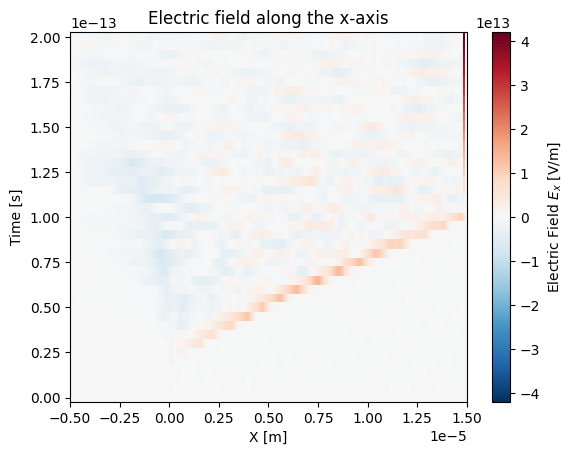
# This is discretized in both space and time
ds["Electric_Field_Ex"].plot()
plt.title("Electric field along the x-axis")
plt.show()
When loading a multi-file dataset using sdf_xarray.open_mfdataset, a
time dimension is automatically added to the resulting xarray.Dataset.
This dimension represents all the recorded simulation steps and allows
for easy indexing. To quickly determine the number of time steps available,
you can check the size of the time dimension.
# This corresponds to the number of individual SDF files loaded
print(f"There are a total of {ds['time'].size} time steps")

# You can look up the actual simulation time for any given index
sim_time = ds['time'].values[20]
print(f"The time at the 20th simulation step is {sim_time:.2e} s")
There are a total of 41 time steps
The time at the 20th simulation step is 1.00e-13 s
You can select and extract a single simulation snapshot using the integer
index of the time step with the xarray.Dataset.isel function. This can be
done by passsing the index to the time parameter (e.g., time=0 for
the first snapshot).
# We can plot the variable at a given time index
ds["Electric_Field_Ex"].isel(time=20)
<xarray.DataArray 'Electric_Field_Ex' (X_Grid_mid: 200)> Size: 2kB
dask.array<getitem, shape=(200,), dtype=float64, chunksize=(200,), chunktype=numpy.ndarray>
Coordinates:
  * X_Grid_mid  (X_Grid_mid) float64 2kB -4.95e-06 -4.85e-06 ... 1.495e-05
    time        float64 8B 1.001e-13
Attributes:
    units:       V/m
    point_data:  False
    full_name:   Electric Field/Ex
long_name: Electric Field $E_x$We can also use the xarray.Dataset.sel function if you wish to pass a
value intead of an index.
Tip
If you know roughly what time you wish to select but not the exact value
you can use the parameter method="nearest".
ds["Electric_Field_Ex"].sel(time=sim_time)
<xarray.DataArray 'Electric_Field_Ex' (X_Grid_mid: 200)> Size: 2kB
dask.array<getitem, shape=(200,), dtype=float64, chunksize=(200,), chunktype=numpy.ndarray>
Coordinates:
  * X_Grid_mid  (X_Grid_mid) float64 2kB -4.95e-06 -4.85e-06 ... 1.495e-05
    time        float64 8B 1.001e-13
Attributes:
    units:       V/m
    point_data:  False
    full_name:   Electric Field/Ex
long_name: Electric Field $E_x$Visualisation on HPCs#
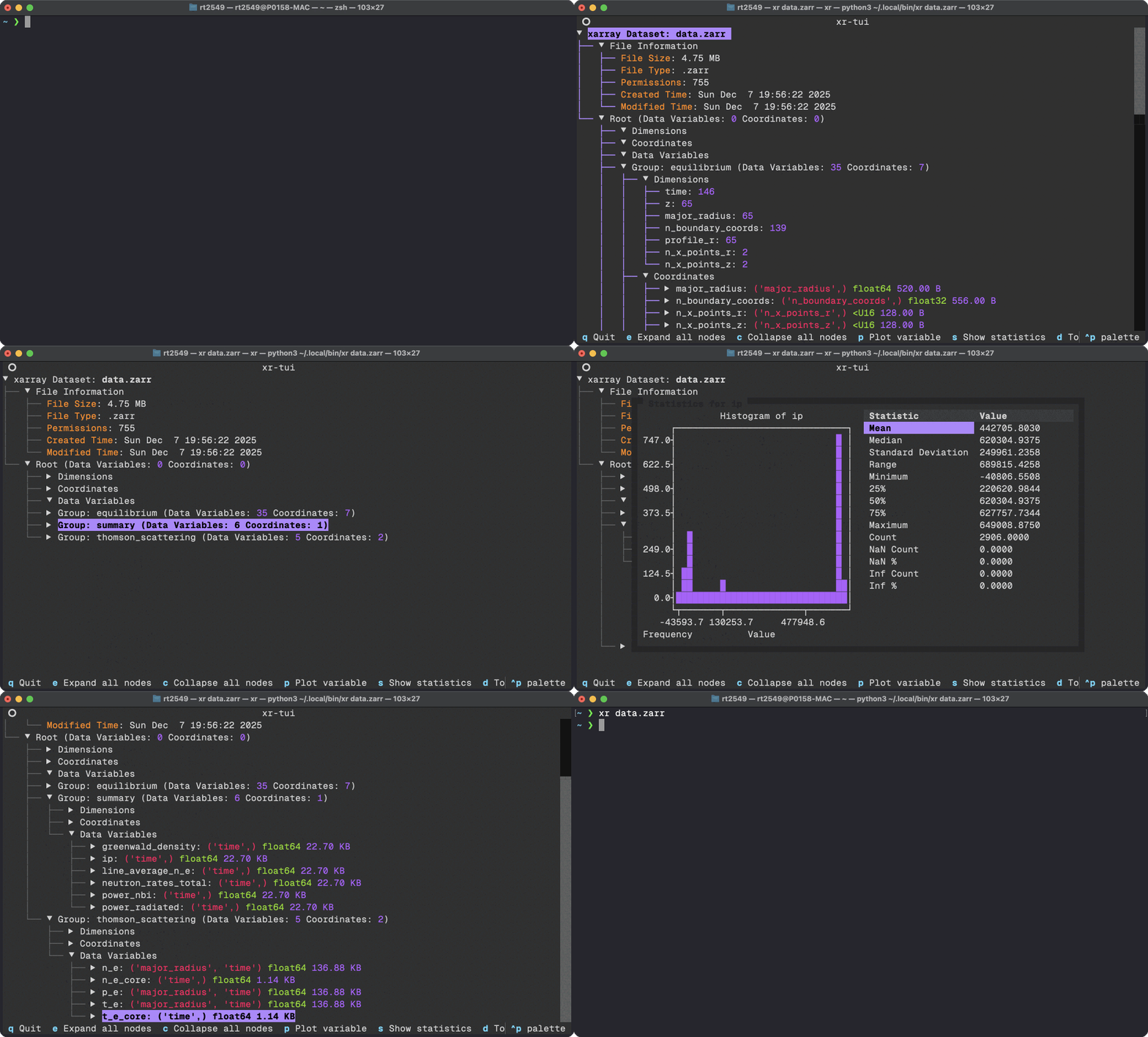
In many cases you will be running EPOCH simulations via a HPC cluster and your subsequent SDF files will probably be rather large and cumbersome to interact with via traditional Jupyter notebooks. In some cases your HPC may outright block the use of Jupyter notebooks entirely. To circumvent this issue you can use a Terminal User Interface (TUI) which renders the contents of SDF files directly in a Terminal and allows for you to do some simple data analysis and visualisation. To do this we shall leverage the xr-tui package which can be installed to either a venv or globally using:
pip install xr-tui sdf-xarray
or if you are using uv
uv tool install xr-tui --with sdf-xarray
Once installed you can visualise SDF files by simply writing in the command line
xr path/to/simulation/0000.sdf
# OR
xr path/to/simulation/*.sdf
Below is an example gif of how this interfacing looks as seen on
xr-tui README.md:
Manipulating data#
These datasets can also be easily manipulated the same way as you
would with numpy arrays.
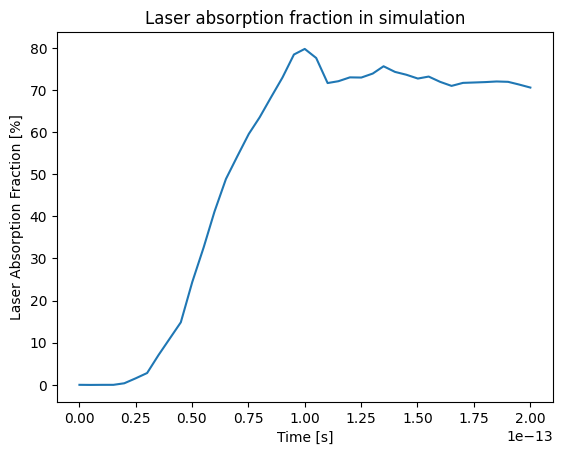
ds["Laser_Absorption_Fraction_in_Simulation"] = (
   (ds["Total_Particle_Energy_in_Simulation"] - ds["Total_Particle_Energy_in_Simulation"][0])
   / ds["Absorption_Total_Laser_Energy_Injected"]
) * 100

# We can also manipulate the units and other attributes
ds["Laser_Absorption_Fraction_in_Simulation"].attrs["units"] = "%"
ds["Laser_Absorption_Fraction_in_Simulation"].attrs["long_name"] = "Laser Absorption Fraction"

ds["Laser_Absorption_Fraction_in_Simulation"].plot()
plt.title("Laser absorption fraction in simulation")
plt.show()
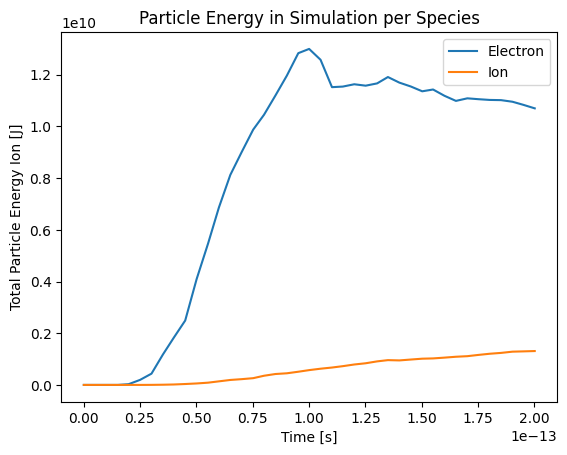
You can also call the plot() function on several variables with
labels by delaying the call to plt.show().
ds["Total_Particle_Energy_Electron"].plot(label="Electron")
ds["Total_Particle_Energy_Ion"].plot(label="Ion")
plt.title("Particle Energy in Simulation per Species")
plt.legend()
plt.show()
print(f"Total laser energy injected: {ds["Absorption_Total_Laser_Energy_Injected"][-1].values:.1e} J")
print(f"Total particle energy absorbed: {ds["Total_Particle_Energy_in_Simulation"][-1].values:.1e} J")
print(f"The laser absorption fraction: {ds["Laser_Absorption_Fraction_in_Simulation"][-1].values:.1f} %")
Total laser energy injected: 1.7e+10 J
Total particle energy absorbed: 1.2e+10 J
The laser absorption fraction: 70.6 %